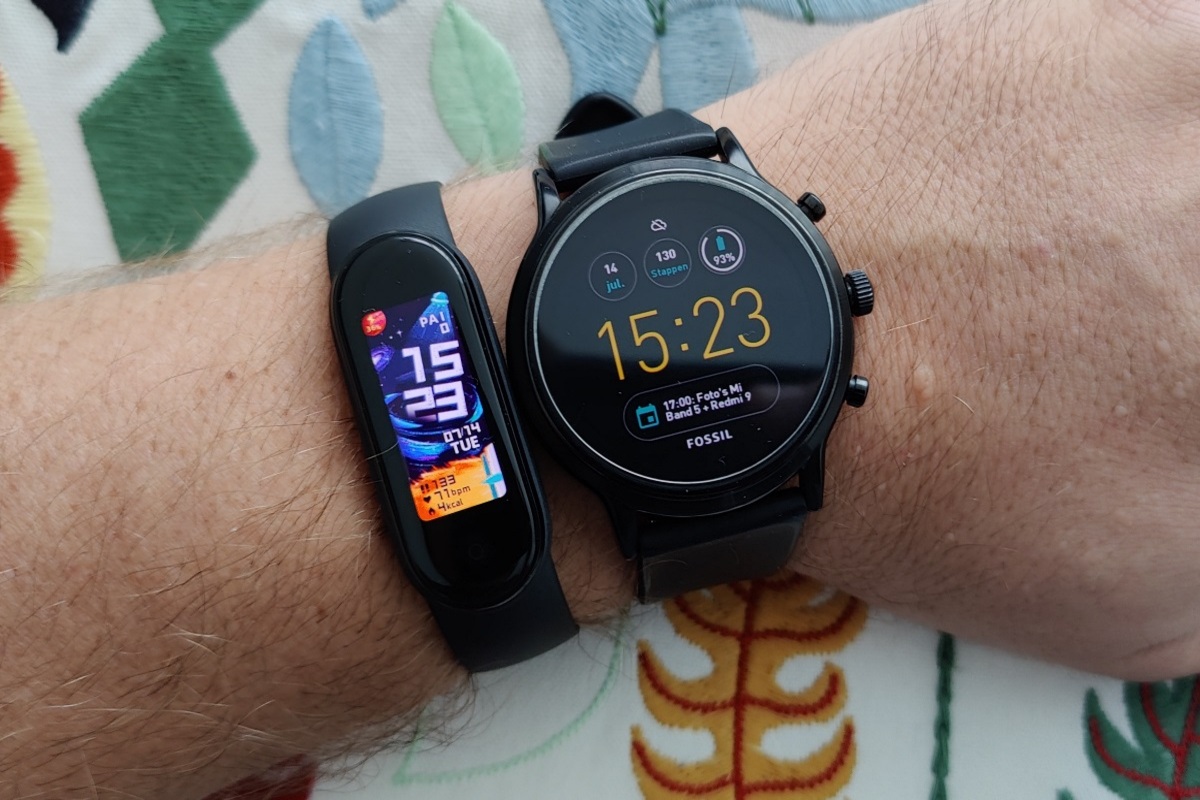
The central difference is capability: a smartwatch is built to do more than health tracking (notifications, apps, calls, payments), while a fitness tracker is built to focus on activity and recovery with simpler interfaces and often longer battery life. The better choice depends on your use case—there isn’t a single dominant option supported by every feature set, sensor package, and app ecosystem.
| Category | Smartwatch | Fitness Tracker |
|---|---|---|
| Primary purpose | Health + broader phone-like features | Health, activity, and training metrics |
| Typical interface | More app controls and richer screens | Simpler menus focused on tracking |
| Notifications/calls | Often a core feature (varies by model) | Often limited or no calling; notifications may be basic (varies) |
| Battery life | Often shorter due to more features (varies widely) | Often longer with fewer power-hungry features (varies) |
| Training metrics | Often strong, but depends on sensors and software | Often strong for activity and recovery; depends on model |
| Comfort for all-day wear | Can be heavier or bulkier (varies) | Often lighter and less intrusive (varies) |
| App ecosystem | Usually deeper integration with phone OS | Usually focused on the vendor’s health app |
| Ownership trade-offs | More features can mean more charging and more settings | More “set-and-forget” tracking, but fewer general-purpose features |
Important limitation: “Smartwatch” and “fitness tracker” are categories, not specific products. Battery life, sensor quality (heart rate, GPS, sleep stages), and training features vary substantially by brand and model. This article compares the typical trade-offs you’ll encounter, and it flags where the answer can reverse depending on the exact devices you’re considering.
What a smartwatch is (and what it’s trying to do)
A smartwatch is a wearable computer paired with your phone. Beyond measuring activity, it commonly supports notifications, messaging, calls (on some models), navigation prompts, music control, payments, and third-party apps. For many people, the value is that the watch becomes a daily “control point” for life on the go, while health tracking is an additional layer.
If you want a deeper look at how smartwatch feature sets affect daily use, see our smartwatch deep dive.
What a fitness tracker is (and what it’s trying to do)
A fitness tracker is primarily designed for health and activity monitoring: steps, workouts, heart-rate trends, sleep tracking, and recovery-style metrics. The interface is usually simpler and the device is often optimized for all-day wear and longer battery life. Many trackers also offer guided training features, but they typically don’t aim to replace your phone for communication or general apps.
If you’re deciding based on tracking depth and comfort, check our fitness tracker review.
Criterion-by-criterion comparison (what changes in real use)
1) Daily usability: “Do I want a wearable computer or a tracking band?”
Practical difference: Smartwatches usually offer more ways to interact with your phone (notifications, quick replies, app controls). Fitness trackers usually emphasize glanceable stats and fewer interactions.
Why it matters: If you frequently miss calls or messages, a smartwatch can reduce friction. If you mainly want to see trends (activity and sleep) and don’t want to manage apps and settings, a tracker can feel more effortless.
Who benefits: Smartwatch: people who want notifications, payments, or app-based workflows. Fitness tracker: people who want low-maintenance tracking and minimal distraction.
Limits: Some trackers include basic notifications; some smartwatches can be configured to be “quiet.” The deciding factor is how you personally use notifications and whether you’ll actually use the extra features.
2) Battery life and charging habits
Practical difference: Smartwatches often have more power-hungry features (brighter screens, more sensors, more background tasks), which can lead to more frequent charging. Fitness trackers often last longer because they focus on tracking and simpler displays.
Why it matters: Charging frequency affects whether you wear the device consistently—especially for sleep tracking and continuous heart-rate monitoring.
Who benefits: Fitness tracker: people who hate daily charging or want multi-day wear. Smartwatch: people who are comfortable charging more often in exchange for richer features.
Limits: Battery life varies widely by model, display settings, GPS usage, and how often you use features like always-on display. Without the exact devices, you can’t assume one category always wins.
3) Training and health metrics: sensors and software matter more than the label
Practical difference: Both categories can track heart rate and activity, but the quality and usefulness depend on the sensor hardware and the algorithms in the companion app. GPS availability (and accuracy), workout modes, and recovery metrics can differ significantly.
Why it matters: If you run, cycle, or train with structured goals, you’ll care about workout capture and how reliably the device measures intensity. If you’re mostly monitoring general activity and sleep, simpler tracking may be enough.
Who benefits: Smartwatch: people who want training plus broader features (music control, navigation prompts, richer workout dashboards). Fitness tracker: people who want strong day-to-day health insights with less distraction.
Limits: Without knowing the exact models, you can’t conclude which category measures better. Compare the specific features you care about (e.g., GPS on-device vs phone GPS, sleep staging depth, workout types supported).
4) Comfort and wearability: “Will you keep it on?”
Practical difference: Fitness trackers are often lighter and less bulky. Smartwatches can be bulkier due to larger displays and additional hardware.
Why it matters: Comfort affects consistency—especially overnight wear and workouts where heat or chafing can be an issue.
Who benefits: Fitness tracker: people who prioritize all-day and overnight wear. Smartwatch: people who accept a bit more bulk for added features.
Limits: Strap materials, band sizes, and case thickness vary by model. A “smartwatch” can still be comfortable; a “tracker” can still feel intrusive depending on fit.
5) Connectivity and ecosystem: phone integration vs vendor app focus
Practical difference: Smartwatches often integrate tightly with the phone’s operating system (notifications, voice assistants, app support). Fitness trackers typically rely on the vendor’s health app for most insights.
Why it matters: If you want to control music, manage calls, or use third-party apps, smartwatch ecosystems tend to be more flexible. If you’re content with one health app and want a streamlined experience, a tracker can be simpler.
Who benefits: Smartwatch: people who want broader app functionality and OS-level integration. Fitness tracker: people who prefer a focused health dashboard and don’t need extra apps.
Limits: Compatibility depends on your phone OS and the specific device’s supported features. Always verify cross-platform support before buying.
6) Hidden ownership trade-offs: subscriptions, updates, and “feature creep”
Practical difference: Some smartwatches and trackers offer advanced features that may require app upgrades or premium subscriptions (varies by brand). Smartwatches also tend to add more settings, which can increase the time you spend tuning the device.
Why it matters: If you don’t want ongoing costs or you prefer minimal maintenance, a tracker with a straightforward feature set can be more predictable.
Who benefits: Fitness tracker: budget-conscious buyers who want core tracking without extra services. Smartwatch: buyers who are comfortable managing settings and potentially paying for premium features.
Limits: Subscription models change over time and differ by region. Check the exact product page and the app’s in-store listing for current terms.
7) Maintenance and durability: water resistance and everyday wear
Practical difference: Both categories can be water-resistant, but the rating and real-world durability depend on the model. Smartwatches may have more exposed electronics due to larger displays and additional sensors.
Why it matters: If you swim, sweat heavily, or want to wear the device in rain, you’ll care about the official water-resistance rating and any guidance about charging after exposure.
Who benefits: Both: active users should prioritize durability and clear manufacturer guidance. The choice depends on which device meets your activity needs.
Limits: Water-resistance ratings don’t guarantee damage-free use in all conditions. Follow manufacturer instructions for cleaning and charging.
8) Privacy and data handling: how your health data is used
Practical difference: Both devices collect health and activity data, but the broader app ecosystem of smartwatches can mean more data pathways (notifications, location services, third-party apps).
Why it matters: If you’re privacy-sensitive, you’ll want to understand what data is stored, shared, and used for personalization.
Who benefits: Fitness tracker: people who prefer a narrower, health-focused data footprint. Smartwatch: people who accept broader integration for convenience.
Limits: Privacy policies vary by brand and can change. Review the current privacy policy and app permissions for the exact models.
When the usual recommendation reverses
- Choose a smartwatch if you’ll use the “phone features” daily. If you regularly rely on notifications, navigation prompts, music control, or payments, the smartwatch’s extra capability can outweigh the battery/complexity trade-off.
- Choose a fitness tracker if you want consistency over features. If you’re mainly tracking steps, sleep, and general recovery—and you’re likely to stop wearing a device that needs frequent charging—a tracker can be the more effective tool.
- Choose the category with the right sensors for your training. If your workouts require on-device GPS or specific workout modes, the correct choice may be a tracker or a smartwatch depending on the exact model’s capabilities.
Hidden ownership trade-offs to consider before buying
- Charging routine becomes part of your health routine. If you skip charging, you may lose sleep tracking or workout capture.
- Notifications can become noise. Smartwatches can be distracting if you enable everything; trackers can feel calmer.
- App dependence is real. Both categories rely on companion apps; if you dislike the app experience, the device won’t feel “worth it.”
- Feature availability can change with updates. Some features may be added or removed; premium features can be gated.
Questions to answer before choosing
- Do you want the device to replace phone interactions (messages, calls, payments), or is tracking enough?
- How often are you willing to charge—daily, every few days, or only occasionally?
- What workouts do you do (running, cycling, gym, swimming), and do you need on-device GPS?
- Is your priority sleep and recovery trends, or do you need more detailed training guidance?
- Will you wear it overnight and during uncomfortable conditions (heat, rain, sweat)?
- How important are privacy controls and app permissions to you?
Conditional verdicts (choose based on your profile)
- Best for simplicity and low running costs (time/attention): Fitness tracker, if you mainly want activity and sleep trends and prefer fewer features to manage.
- Best for city driving and day-to-day convenience: Smartwatch, if you want notifications, navigation prompts, and quick access to phone functions.
- Best for long trips and travel: Either can work, but the deciding factor is battery life and whether you need on-wrist communication or just health tracking.
- Best for family use (shared routines, minimal fuss): Fitness tracker for people who want straightforward tracking; smartwatch for those who benefit from connectivity features.
- Best for performance-focused training: The category with the right workout modes and sensors for your sport (GPS, heart-rate accuracy, training dashboards), not the label.
- Best for “I’ll actually wear it every day”: Whichever device you can comfortably wear and charge consistently.
If you share the exact models you’re considering (or at least your phone type and your top 2–3 goals like sleep, running, or notifications), you can narrow the decision quickly—because in this category, the specific feature set matters more than the smartwatch vs fitness tracker label.